Home Page | Windows 11 Recovery And Installation
Same Day Repairs | House Calls | Drop Off | Pickup & Delivery | Map & Directions
Fast Contact Form or Call: 413 388-3121
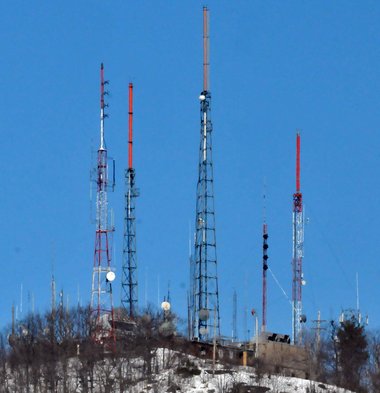
Mount Holyoke, Holyoke Ma
Emergency! 51 - ringtone
Contacting PC Steven is fast and easy
No long automated
recoding's, personally answering phone calls is the
goal. When unable to answer, calls are returned
momentarily.
PC Computer Hardware Troubleshooting
A big problem when repairing a computer is
when one faulty component causes anothere component
to slowly degrade over time and eventually fail. The
faultly component gets replaced and the
failing component works, how is this possible? It
takes a little time for the faulty component to once
again degrade the working component to the point of
no return.
Electronics can play funny tricks, it's important to have a lot of good working spare parts when preforming the process of elimination, testing equipment and error codes are not always forthcoming.
Poor quality, worn out power supply units (PSU) are a big cause of misdiagnosing the wrong computer component.
A lot of power supplies units will test correctly using a (PSU) tester, however, their are many aspects to a (PSU) providing clean accurately dependable power, especially when it is supporting a multi thousand dollar video card and computer components.
)
Inside, Massachusetts Green High Performance Computer Center (MGHPCC) Located in Holyoke, MA This is the 2012 Construction of the data center. The public is welcome to tour this huge state-of-the-art data center on weekends. People must call in advance, easy to plan and free to visit.
)
Software and driver troubleshooting support
Out of date incompatible drives are never a problem at pcsteven's computer service. If it exists it is on the internet, finding drivers and software on the internet is not always easy, it is out there. If it's not on the internet it can be made. There are lots of people that know how to make and modify there own drivers. They will take an old application and update it to work in today's world. Uninstalling and reinstalling seems to be the first thing technicians and people do. Looking for an updated driver is also something people will try. Simply typing your question into Google, word for word, will bring back some interesting results. Learning to use Google is a trick within its self.
One of the first steps in troubleshooting drivers and software is to make sure the computer is completely tuned up and running correctly. A lot of people will choose to use maintenance software to do this, however their is always something that gets in the way. Reaching out and talking to someone maybe your next step if the first 2 didn't work.
Next we are going to cover, the system BIOS, Operating System,
Software, Drivers and the System Registry
Legacy vs. UEFI system BIOS: Around 2012
motherboard manufactures started using UEFI BIOS system vs an old Legacy
version. Many people were confused by this terminology, in a nut shell UEFI
gives the operating system more control over the computer then the older
legacy BIOS did. BIOS stands for "Basic Input/Output System" for some
people, other people believe it stands for "Binary Installed Operating
System" witch is the main operating system for the motherboard, pci board or
main board. UEFI, stands for "Unified Extensible Firmware Interface". Once
again modern UEFI bios settings allow you more control over the motherboard
then its older legacy bios version did.
Windows 11 Help &
Support
Windows 11 operating system can be installed in older computers that don't meet the minimum system hardware requirements. When a computer is capable of running Windows 10 it should be able to run and handle Windows 11.
During the Windows 11 installation process a few Windows registry keys can be adding to the system registry that will bypass the Microsoft minimum system hardware requirements evaluation.
People have not reported any problems using the system registry work around. Microsoft is providing security updates and drivers for systems that are using the added registry keys.
Windows 10 drivers are backwards compatible with Windows 11 (OS), there should not be a driver compatibility problem with installing Windows 11 on older computers.
I do not recommend using third party apps or programs to bypass Win 11 system minimum requirements. Free third party apps downloaded from the internet are bad in general.
Upgrade to an SSD hard drive for only fifty dollars more with a Windows 11 upgrade.
Can't find hard drive during Windows 11 OS installation?
Intel 11th through 14th I generation processors need a special Intel rapid storage technology (RST) driver in order to install windows 11.
Motherboards can not see the hard drive without this extra driver installation during the Windows 11 installation process, everybody finds this to be a major pain in the brain.
It is the same thing that happened during 2010 when RAID driver configuration reemerged form the 1970's, however, the terminology RAID did not get coined until the late 1980's. Let me help you with this installation problem and never worry about it again.
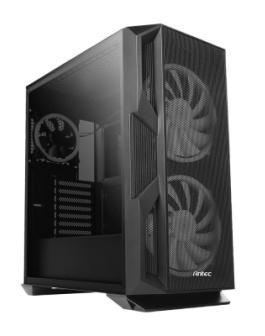
Antec computer cases are used in the custom-built computers I make for my clients. These high-performance computer cases are known for both their gaming and professional power user abilities.
High quality high output Antec power supplies, 350 to 1000 watts, assure proper pc component protection.
Long life Steal ball bearing fan motors and high-grade Aluminum or high-grade Steal construction makes this the perfect desktop computer case for computer enthusiasm.